

TimeandBillingSoftwareforAccountingFirms
Track time, manage WIP, invoice accurately, and keep billing connected to client work in TPS Cloud Axis.




Revenue control
Capture billable time before it slips away
Accounting firms do not just need a timer. They need a dependable way to capture billable work, review WIP, prepare invoices, monitor AR, and understand which clients and services are driving profitability.
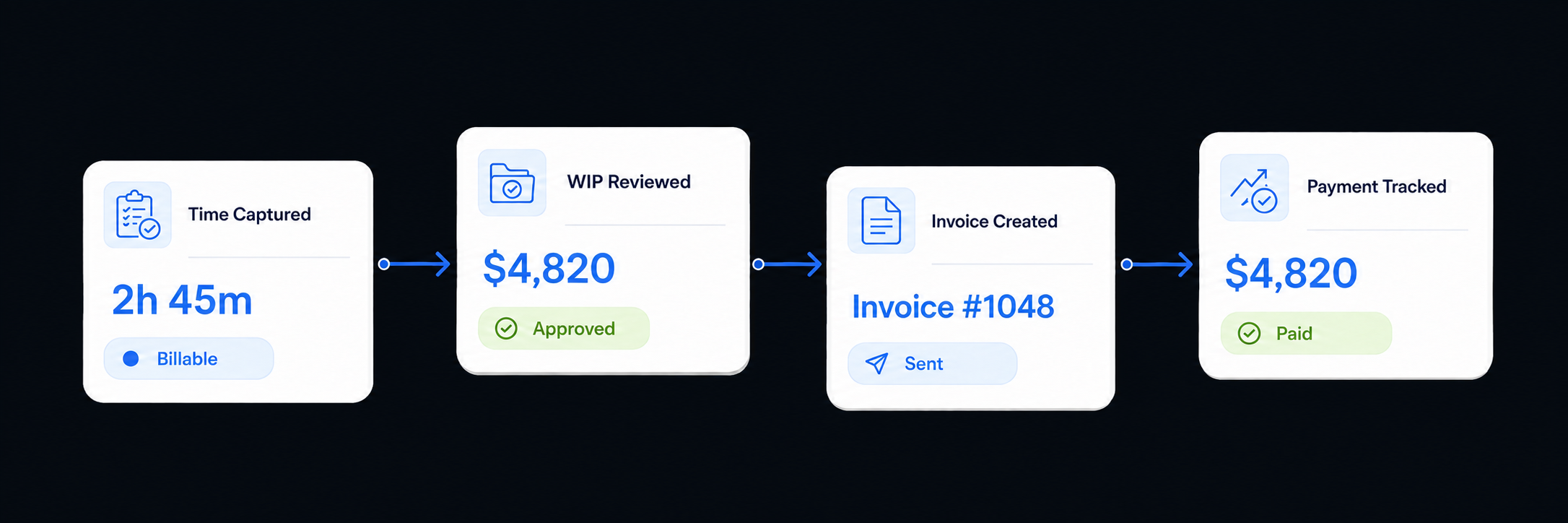
TPS Cloud Axis keeps time entries tied to the right client, service, staff member, and work code, so billing review starts with cleaner source data and fewer end-of-month surprises.
Multiple Time Input Methods
Support manual entry and real-time tracking so staff can record work in the rhythm that fits each engagement.
Chargeable vs. Non-Chargeable Time
Separate billable, non-billable, write-off, and internal activity for cleaner client invoices and profitability reports.
Customizable Work Code Structure
Map time to the services, departments, and work codes your firm already uses for management reporting.
Enhanced Reporting
Review time, WIP, AR, productivity, and client profitability signals without waiting for manual spreadsheet cleanup.
Billing workflows
One place to run the billing cycle
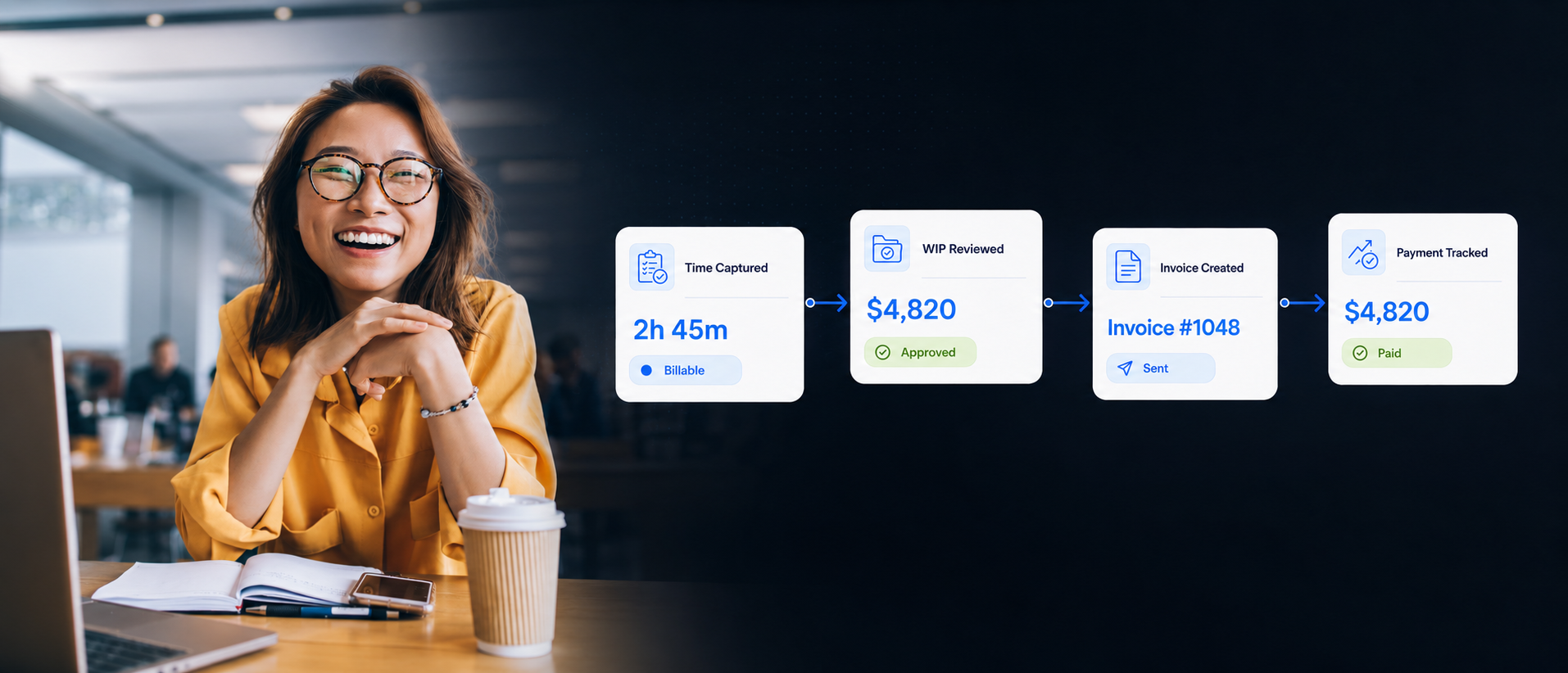
Move from captured time to WIP review, invoicing, collections, and realization reporting without sending partners through disconnected tools.
Time tracking
Capture billable work as it happens
Staff enter time against the right client, service, job, and period so billing review starts from clean source data.
Helps replace
- Keep time tied to clients and services from the start
- Reduce missing billable work before WIP review
- Give managers a clearer view of staff activity
Time entries flow into billing
Approved work is already connected to the client record.
Managers see exceptions sooner
Missing or aging entries are easier to catch before month end.
Partners review with context
Client, service, staff, and period details stay attached.
Firm billing fit
When time tracking has to support the billing review
Standalone time tracking tools can record hours, but accounting firms also need WIP control, invoicing, AR visibility, client context, and reporting that matches how partners manage the practice.
TPS Cloud Axis is a better fit when billing has to stay connected to the rest of the client lifecycle instead of becoming another isolated system for staff to maintain.
Recurring services
For teams billing across tax, bookkeeping, advisory, audit, payroll, CAS, or other repeatable client work.
Partner visibility
For firms that need to see unbilled work, collection status, write-offs, realization, and profitability before month-end cleanup.
Billing context
For billing reviews that depend on invoices, documents, client notes, tasks, and communication history being close at hand.
Practice management
For firms that want time and billing inside a broader accounting practice management platform, not a generic employee time clock.
Integrations for Billing, Payments, and Reporting
Keep time and billing connected to the systems your accounting firm already relies on. TPS Cloud Axis integrates with tools such as QuickBooks Online, Microsoft 365 Outlook, Microsoft Power BI, DocuSign, Adobe Sign, CPA Charge, Stripe, PayPal, PayClix, and Clover Connect.





'%3e%3cpath%20id='Vector'%20d='M36.9971%206.18457C38.7993%206.18457%2040.274%207.6592%2040.274%209.46143V10.4114L35.7214%2013.6634L20.2221%2024.3401L4.72276%2013.5551V35.1243H3.55619C1.75396%2035.1243%200.279297%2033.6497%200.279297%2031.8474V9.46234C0.279297%207.66008%201.75396%206.18545%203.55619%206.18545L20.2221%2018.5419L36.9962%206.18545L36.9971%206.18457Z'%20fill='%23E75A4D'/%3e%3cpath%20id='Vector_2'%20d='M3.55664%206.18457L20.2225%2018.541L36.9976%206.18457H3.55664Z'%20fill='url(%23paint0_linear_1558_4709)'/%3e%3cpath%20id='Vector_3'%20d='M4.72266%2013.5552V35.1243H35.7221V13.6635L20.222%2024.3402L4.72266%2013.5552Z'%20fill='%23E7E4D7'/%3e%3cpath%20id='Vector_4'%20d='M4.72266%2035.1243L20.222%2024.3402L20.1518%2024.2905L4.72266%2034.8873V35.1243Z'%20fill='%23B8B7AE'/%3e%3cpath%20id='Vector_5'%20d='M35.7228%2013.6636L35.7317%2035.1244L20.2227%2024.3403L35.7228%2013.6636Z'%20fill='%23B7B6AD'/%3e%3cpath%20id='Vector_6'%20d='M40.2744%2010.4115L40.2797%2031.8502C40.2016%2034.2331%2039.1691%2035.0836%2035.7315%2035.1236L35.7227%2013.6627L40.2753%2010.4106L40.2744%2010.4115Z'%20fill='%23B2392F'/%3e%3cpath%20id='Vector_7'%20d='M3.55664%206.18457L20.2225%2018.541L36.9976%206.18457H3.55664Z'%20fill='url(%23paint1_linear_1558_4709)'/%3e%3cpath%20id='Vector_8'%20d='M3.55664%206.18457L20.2225%2018.541L36.9976%206.18457H3.55664Z'%20fill='url(%23paint2_linear_1558_4709)'/%3e%3cpath%20id='Vector_9'%20d='M3.55664%206.18457L20.2225%2018.541L36.9976%206.18457H3.55664Z'%20fill='url(%23paint3_linear_1558_4709)'/%3e%3cpath%20id='Vector_10'%20d='M3.55664%206.18457L20.2225%2018.541L36.9976%206.18457H3.55664Z'%20fill='url(%23paint4_linear_1558_4709)'/%3e%3cpath%20id='Vector_11'%20d='M3.55664%206.18457L20.2225%2018.541L36.9976%206.18457H3.55664Z'%20fill='url(%23paint5_linear_1558_4709)'/%3e%3cpath%20id='Vector_12'%20d='M3.55664%206.18457L20.2225%2018.541L36.9976%206.18457H3.55664Z'%20fill='url(%23paint6_linear_1558_4709)'/%3e%3cpath%20id='Vector_13'%20d='M3.55664%206.18457L20.2225%2018.541L36.9976%206.18457H3.55664Z'%20fill='url(%23paint7_linear_1558_4709)'/%3e%3cpath%20id='Vector_14'%20d='M3.55664%206.18457L20.2225%2018.541L36.9976%206.18457H3.55664Z'%20fill='%23F7F5ED'/%3e%3c/g%3e%3cdefs%3e%3clinearGradient%20id='paint0_linear_1558_4709'%20x1='9.57338'%20y1='12.3639'%20x2='30.9402'%20y2='12.3639'%20gradientUnits='userSpaceOnUse'%3e%3cstop%20stop-color='%23F8F6EF'/%3e%3cstop%20offset='1'%20stop-color='%23E7E4D6'/%3e%3c/linearGradient%3e%3clinearGradient%20id='paint1_linear_1558_4709'%20x1='9.57338'%20y1='12.3639'%20x2='30.9402'%20y2='12.3639'%20gradientUnits='userSpaceOnUse'%3e%3cstop%20stop-color='%23F8F6EF'/%3e%3cstop%20offset='1'%20stop-color='%23E7E4D6'/%3e%3c/linearGradient%3e%3clinearGradient%20id='paint2_linear_1558_4709'%20x1='9.57338'%20y1='12.3639'%20x2='30.9402'%20y2='12.3639'%20gradientUnits='userSpaceOnUse'%3e%3cstop%20stop-color='%23F8F6EF'/%3e%3cstop%20offset='1'%20stop-color='%23E7E4D6'/%3e%3c/linearGradient%3e%3clinearGradient%20id='paint3_linear_1558_4709'%20x1='9.57338'%20y1='12.3639'%20x2='30.9402'%20y2='12.3639'%20gradientUnits='userSpaceOnUse'%3e%3cstop%20stop-color='%23F8F6EF'/%3e%3cstop%20offset='1'%20stop-color='%23E7E4D6'/%3e%3c/linearGradient%3e%3clinearGradient%20id='paint4_linear_1558_4709'%20x1='9.57338'%20y1='12.3639'%20x2='30.9402'%20y2='12.3639'%20gradientUnits='userSpaceOnUse'%3e%3cstop%20stop-color='%23F8F6EF'/%3e%3cstop%20offset='1'%20stop-color='%23E7E4D6'/%3e%3c/linearGradient%3e%3clinearGradient%20id='paint5_linear_1558_4709'%20x1='9.57338'%20y1='12.3639'%20x2='30.9402'%20y2='12.3639'%20gradientUnits='userSpaceOnUse'%3e%3cstop%20stop-color='%23F8F6EF'/%3e%3cstop%20offset='1'%20stop-color='%23E7E4D6'/%3e%3c/linearGradient%3e%3clinearGradient%20id='paint6_linear_1558_4709'%20x1='9.57338'%20y1='12.3639'%20x2='30.9402'%20y2='12.3639'%20gradientUnits='userSpaceOnUse'%3e%3cstop%20stop-color='%23F8F6EF'/%3e%3cstop%20offset='1'%20stop-color='%23E7E4D6'/%3e%3c/linearGradient%3e%3clinearGradient%20id='paint7_linear_1558_4709'%20x1='9.57338'%20y1='12.3639'%20x2='30.9402'%20y2='12.3639'%20gradientUnits='userSpaceOnUse'%3e%3cstop%20stop-color='%23F8F6EF'/%3e%3cstop%20offset='1'%20stop-color='%23E7E4D6'/%3e%3c/linearGradient%3e%3cclipPath%20id='clip0_1558_4709'%3e%3crect%20width='40'%20height='40'%20fill='white'%20transform='translate(0.279297%200.654541)'/%3e%3c/clipPath%3e%3c/defs%3e%3c/svg%3e)
'%3e%3cpath%20d='M39.6855%2012.3145H12.3145V39.6855H39.6855V12.3145Z'%20fill='white'/%3e%3cpath%20d='M39.6855%2052L52%2039.6855H39.6855V52Z'%20fill='%23F72A25'/%3e%3cpath%20d='M52%2012.3145H39.6855V39.6855H52V12.3145Z'%20fill='%23FBBC04'/%3e%3cpath%20d='M39.6855%2039.6855H12.3145V52H39.6855V39.6855Z'%20fill='%2334A853'/%3e%3cpath%20d='M0%2039.6855V47.8952C0%2050.1635%201.83659%2052%204.10482%2052H12.3145V39.6855H0Z'%20fill='%23188038'/%3e%3cpath%20d='M52%2012.3145V4.10482C52%201.83659%2050.1635%200%2047.8952%200H39.6855V12.3145H52Z'%20fill='%231967D2'/%3e%3cpath%20d='M39.6855%200H4.10482C1.83659%200%200%201.83659%200%204.10482V39.6855H12.3145V12.3145H39.6813V0H39.6855Z'%20fill='%234285F4'/%3e%3cpath%20d='M17.9301%2033.5453C16.9059%2032.8555%2016.1993%2031.8441%2015.8142%2030.5111L18.1882%2029.5335C18.4041%2030.3545%2018.7806%2030.9892%2019.3181%2031.4421C19.8513%2031.8949%2020.503%2032.1149%2021.2605%2032.1149C22.0391%2032.1149%2022.7035%2031.8779%2023.2621%2031.4082C23.8207%2030.9343%2024.1%2030.3333%2024.1%2029.6055C24.1%2028.8607%2023.8037%2028.2513%2023.2155%2027.7774C22.6273%2027.3034%2021.8868%2027.0707%2021.0066%2027.0707H19.6355V24.722H20.8669C21.6244%2024.722%2022.2677%2024.5189%2022.7881%2024.1042C23.3086%2023.6937%2023.5668%2023.1309%2023.5668%2022.4157C23.5668%2021.7809%2023.334%2021.2731%2022.8685%2020.8922C22.403%2020.5114%2021.8148%2020.321%2021.0997%2020.321C20.4014%2020.321%2019.8471%2020.5071%2019.4366%2020.8796C19.0261%2021.252%2018.7172%2021.7259%2018.5394%2022.2506L16.1908%2021.2731C16.504%2020.3887%2017.0752%2019.6101%2017.9131%2018.9372C18.751%2018.2643%2019.8217%2017.9258%2021.1208%2017.9258C22.0814%2017.9258%2022.949%2018.1119%2023.7149%2018.4843C24.4809%2018.8568%2025.0817%2019.373%2025.5177%2020.029C25.9535%2020.6891%2026.1693%2021.4297%2026.1693%2022.2506C26.1693%2023.0885%2025.9662%2023.7953%2025.5642%2024.3792C25.1622%2024.959%2024.6628%2025.4075%2024.0746%2025.7165V25.8561C24.832%2026.1693%2025.4964%2026.6855%2025.9832%2027.3457C26.4783%2028.0143%2026.7279%2028.8099%2026.7279%2029.7409C26.7279%2030.6718%2026.4909%2031.5013%2026.0212%2032.2292C25.5472%2032.957%2024.8956%2033.5325%2024.0662%2033.9515C23.2367%2034.3704%2022.3015%2034.582%2021.2647%2034.582C20.0629%2034.582%2018.9541%2034.2392%2017.9301%2033.5453ZM32.5128%2021.764L29.9059%2023.6472L28.6026%2021.6709L33.2787%2018.2982H35.073V34.2097H32.5128V21.764Z'%20fill='%231A73E8'/%3e%3c/g%3e%3cdefs%3e%3cclipPath%20id='clip0_315_2023'%3e%3crect%20width='52'%20height='52'%20fill='white'/%3e%3c/clipPath%3e%3c/defs%3e%3c/svg%3e)






When email, calendars, online payments, QuickBooks Online, accounts receivable, and reporting are closer to your billing process, your team spends less time reconciling systems and more time managing the work. Power BI reporting can extend visibility into billing trends, realization, productivity, and firm performance.
Time and Billing Inside a Complete Practice Management Platform
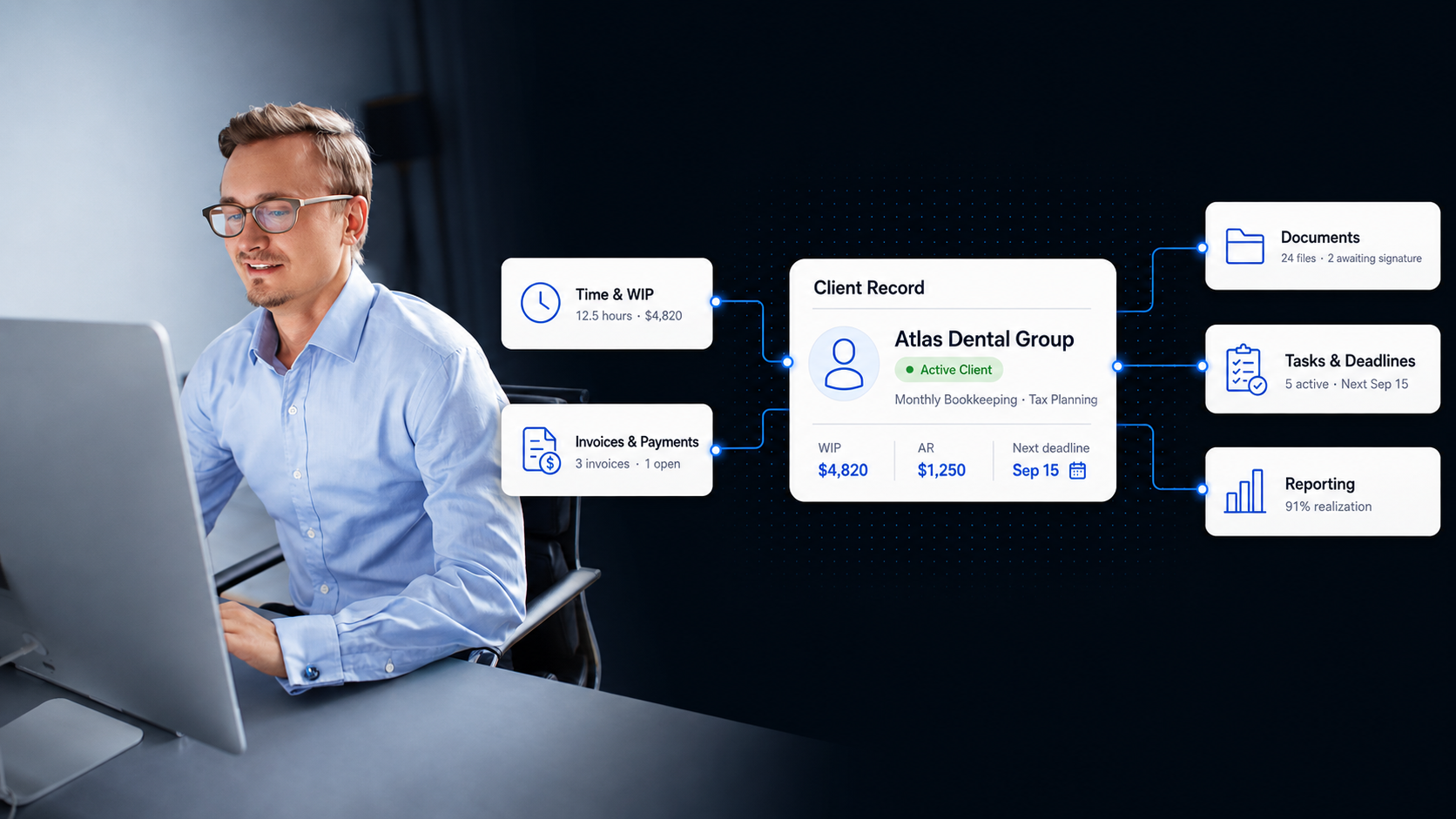
Billing is strongest when it is connected to the work that created it. TPS Cloud Axis brings time, WIP, invoices, client records, workflow, documents, and reporting into one accounting practice management system.
That gives partners and managers a clearer path from staff activity to revenue, collection, and client profitability.
Advanced Reporting & Analytics
Review billing activity alongside the firm performance metrics partners actually ask for: time, Work in Progress (WIP), Accounts Receivable (AR), productivity, workflow, and profitability.
TPS Cloud Axis supports individual office reporting and consolidated reporting across multiple locations, with Microsoft Power BI available when your firm wants deeper dashboards and data visualization.
Client Management & Communication
Keep client billing history, notes, invoices, emails, documents, and workflow activity close to the client record so billing review starts with the facts already organized.
Use the Client Historical Log and Client Inquiry views to understand time, WIP, AR, and client history without hunting across disconnected tools.
Give clients a more organized experience with secure document exchange, messaging, and portal access tied back to the firm record.
Employee Scheduling & Task Lists
Manage staff schedules, task lists, calendars, and time tracking in the same operational environment.
When scheduling and billing activity are closer together, managers can see capacity pressure, missed time, and bottlenecks before they affect invoices or deadlines.
Unparalleled Customer Support
TPS Software support is built around accounting firm operations, not generic software queues. When your firm has a billing, workflow, or reporting question, you can talk to someone who understands the practice context.
Instructional videos are available in the platform, and the support team is available by phone or email when your staff needs help from a person.
Related Cloud Axis workflows
Questions Firms Ask
Time and Billing Software FAQs
Short answers for firms comparing time tracking, billing, WIP, AR, and practice management options.
What is time and billing software for accountants? +
Time and billing software for accountants helps firms capture billable and non-billable time, review WIP, create invoices, monitor accounts receivable, and report on productivity and profitability.
How is TPS Cloud Axis different from basic time tracking software? +
Basic time tracking software usually stops at recorded hours. TPS Cloud Axis connects time entries with billing, client management, workflow, documents, payments, and reporting for accounting firm operations.
Can TPS Cloud Axis help with WIP management? +
Yes. TPS Cloud Axis helps firms review work in progress by client, staff, service, and period so billing decisions can happen before work becomes stale or difficult to collect.
Does TPS Cloud Axis support accounts receivable visibility? +
Yes. Firms can monitor open balances, payment status, and collection follow-up alongside billing activity and client history.
Can it connect with payment and accounting tools? +
TPS Cloud Axis supports integrations with tools accounting firms use for payments, accounting, email, calendars, document signing, and reporting, including QuickBooks Online, Microsoft Outlook, Stripe, PayPal, CPA Charge, DocuSign, Adobe Sign, and Microsoft Power BI.
Who is TPS Cloud Axis time and billing best for? +
It is best for accounting and CPA firms that need time tracking, billing, WIP, AR, reporting, and client context in one practice management platform.
Ready to see it live?
See Time, WIP, Billing, and AR in One Platform
See how TPS Cloud Axis helps accounting firms capture billable work, invoice with better context, monitor collections, and connect billing to the rest of practice management.